Bending Tables
It’s been two months since the last update, and this update is one of the biggest in a really long time. I could probably call it Visualizer v5 - it’s been almost three years since v4, after all. 🤔
The biggest addition is Journal, and it all started when Bending Spoons acquired Airtable. Their usual playbook is to buy a service, let go of everyone deemed non-essential, hike up the prices, and squeeze as much out of it as possible. And for years, Airtable had been my answer to bulk editing.
Way back in 2022, someone asked for a way to select the 15 shots they made from one bag and set the coffee details once, instead of going through “15 time consuming steps.” In 2023, I closed that request by explaining that I had tried several approaches before deciding to use a tool that already did it, and did it “better than I ever could.” That became the Airtable integration.
I’m a backend developer, so JavaScript-heavy interfaces have never been my comfort zone. But coding agents have gotten good enough that I finally felt confident tackling this properly. So I did. 😅
Your shots, at a glance
Journal puts your shots in an editable table, with coffee, profile, dose, grind setting, yield, time, and enjoyment alongside each other. The Columns button next to search lets you choose which columns to show, hide the ones you don’t use, and drag them into whatever order makes sense for you. Tags, private notes, custom fields, and tasting assessments can be added as columns too.
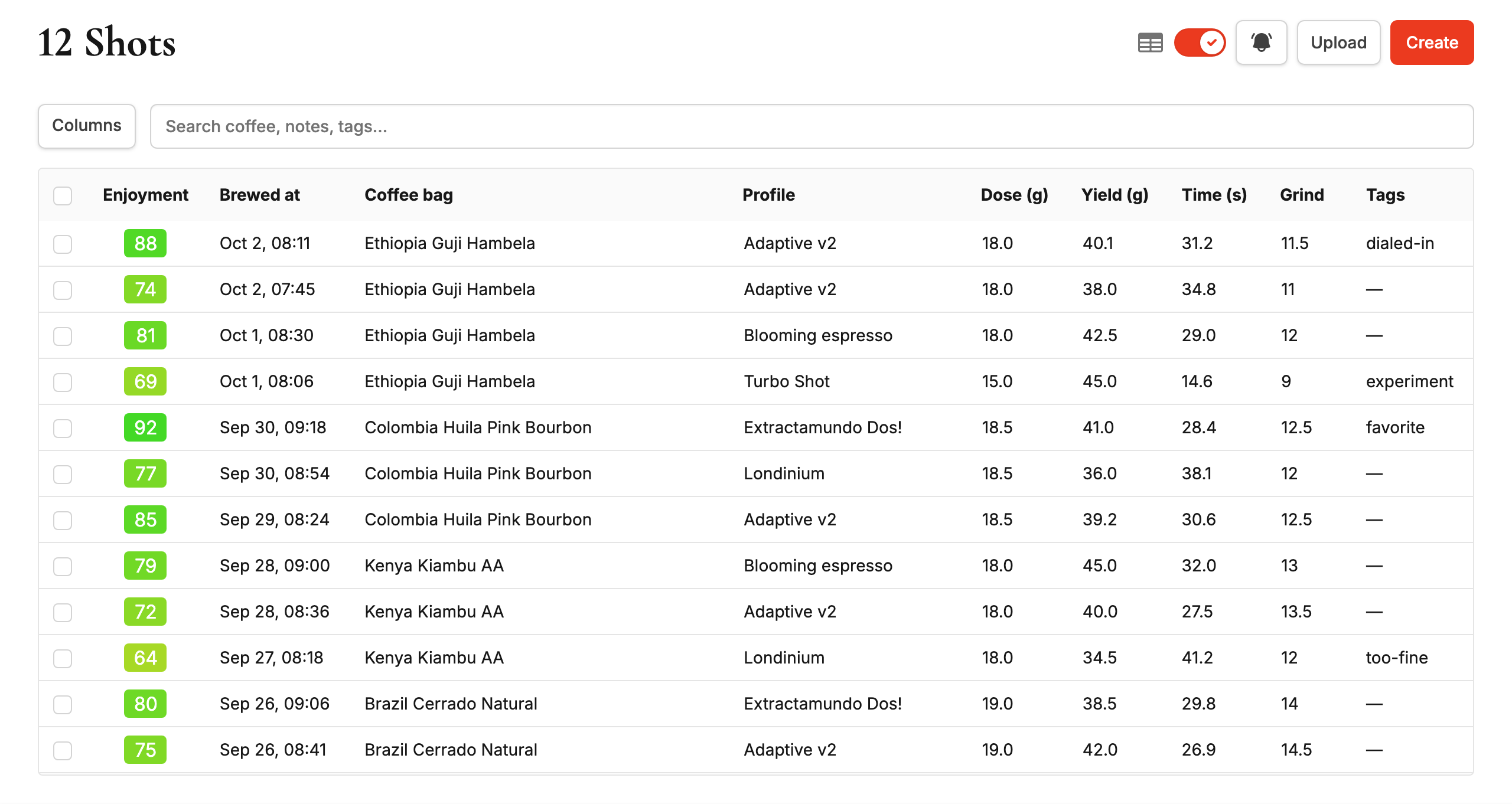
Simple values can be edited directly in the table. Coffee, tags, and rich text notes open an editor without taking you away from your history. You can also select up to 100 shots and apply the same values to all of them in one go. Select two shots and you can jump straight into a comparison, too.
For those direct table edits, Enter saves your change and moves down one row, while Shift+Enter saves and moves up. Both keep you in the same column, so you can work through grind settings or enjoyment scores without reaching for the mouse.
This table view works especially well with Coffee Management. Select the shots you brewed from a bag, assign the coffee once, and then look through your grind settings, recipes, and tasting notes together. Much less clicking around when you’re trying to understand what worked during a dial-in session. And those “15 time consuming steps” from 2022? Now it’s one. Only took me four years. 🙈
If you’ve been following Visualizer for a while, you know I keep coming back to the same problem: what did I do last time with this coffee? I first took a stab at it with Recent Grinder Settings, because I kept forgetting the grind setting for my decaf. Then came Instant Filters, and last year the Coffee Bags page, where you can tap a bag and see all of its shots. With Journal, those shots now show up in a table, with dose, grind, yield, time, and enjoyment side by side. Enjoyment is color-coded too, so the good ones jump right out. 🤩
Outside of Visualizer, I’ve been writing a journal every day for years now, and what makes the biggest difference for me is reading it back. That’s where the magic happens. Coffee is no different. Your machine records how the shot ran, but the coffee, the grind setting, and how it tasted are up to you. Until now, adding those meant opening every shot, editing it, saving, and going back. No wonder it was so easy to skip. 😬
With Journal, it’s a couple of keystrokes, even on your phone while you’re still sipping. And once your shots have those details, patterns that used to be buried across dozens of shot pages show up on a single screen. Your shot history finally becomes something you actually use, not just something you save and forget. Game changer.
I think Journal should cover everything I used Airtable for, but more integrated and faster. You’re working directly with your shots on Visualizer, without jumping between two tools and waiting for them to sync.
The Airtable integration is not going away, unless they kill the API. If you like using it, keep using it. I wanted a good option inside Visualizer that doesn’t depend on what happens to another company’s product. And I’ve also spent so much time fixing the integration with their shitty API that I don’t want to throw all that work away. 😂
Journal is available to Premium users and is off by default. On desktop, just flip the new toggle on your shot list, and you can switch back and forth between Journal and the familiar card view whenever you want. You can also enable it in your profile settings.
Quite a bit of work went into the phone layout as well, including touch-friendly column rearranging, a more compact interface, and pull to refresh. But please let me know if something doesn’t work quite right, as this is a massive code change.
Search for everyone
Instant Filters are now available to everyone, and are no longer a Premium-only feature. You can search as you type and filter by date or enjoyment in the regular shot list, including on free accounts.
Search also got simpler: one box searches across coffee, roasters, profiles, grinders, and notes. Premium search also includes tags and private notes. That now works in both Journal and the regular shot list, so you don’t have to remember which field you put something in.
The only difference that remains: free users can only search shots added in the last month, while Premium includes your complete history.
No history file? No problem
You can now create shots manually, without uploading a file.
Use Create on your shot list, enter your brew details and notes, and the shot joins your history alongside the uploaded ones. This makes Visualizer useful even if your machine doesn’t export shot data, or you simply forgot to record a brew.
Manual shot creation is also available to everyone, including free accounts. 🥳
A few other things
Following a request to update tags through the API, Premium users can now set or clear shot tags through their integrations. I also fixed unexpected 406 errors and several pagination and error-handling issues.
The coffee URL importer in Coffee Management also got reliability improvements and more careful instructions for extracting coffee details. There were older-browser fixes, performance improvements, security hardening, and the usual pile of dependency updates too.
I’m also experimenting with Jev for grind suggestions based on your own shot history: which way to adjust your next shot, and where to start when opening a new coffee bag. These are still in testing, so I’ll share more once I’m happy with how they behave.
All together, that’s 107 commits across 228 files, with 6,063 lines added and 1,375 removed since the last update. You can explore the full diff for all the details.
With that many changes, I wouldn’t be surprised if I’ve missed a workflow or two in testing. Please send any and all bug reports through GitHub issues or email.
Thanks for reading, and enjoy your weekend! ☕